
Tracking Dispatches
Once the dispatches are assigned and started, you can track all your dispatches and check the status of each order within the dispatch from a single place. The Dispatch Listing page has the required details for you to track your dispatches.
Click on ‘Dispatches’ from the side navigation menu to land on the Dispatch Listing Page
This page shows you the list of all the dispatches on the left-hand side and a Map on the right-hand side. By selecting a dispatch, you can track its progress on the map.
You can also search a dispatch by the Driver's name by simply entering their name into the search bar and selecting their name from the list. Once you have selected a driver, their status and dispatch details will be displayed for your reference.
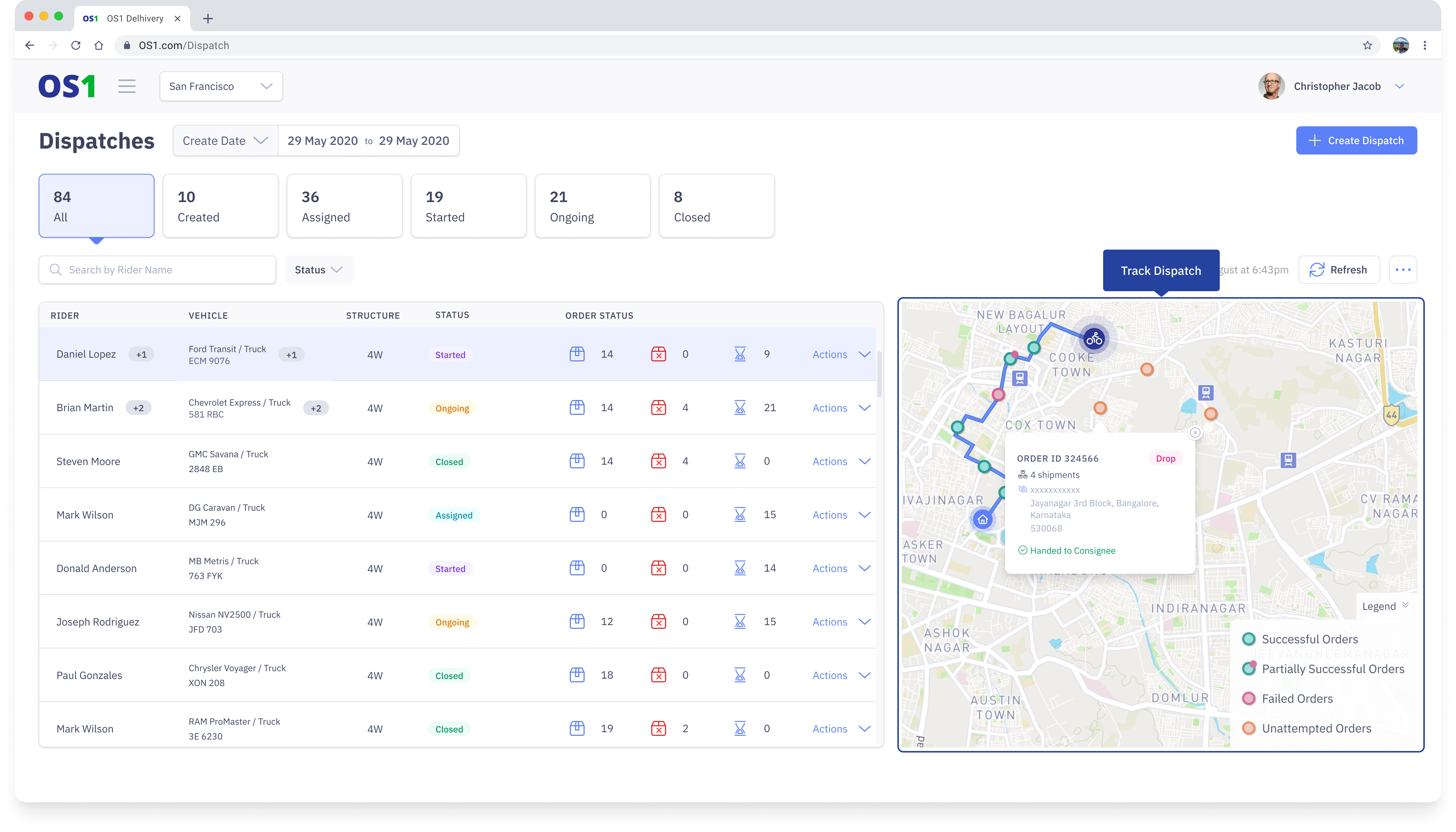
You can filter dispatches based on their status. DispatchOne allows you to filter dispatches based on the following status:
- Assigned: These are active dispatches in the system which are just assigned to drivers but not yet published to the Driver App
- Started: These dispatches are published to the Driver App but the driver has not started with any task
- Ongoing: These dispatches are currently ongoing and the driver has completed at least one task (Pickup/drop)
- Closed: When all the tasks are completed on the dispatch and when "End Dispatch" has been triggered